A+ Content Design Tips from Top Amazon Sellers
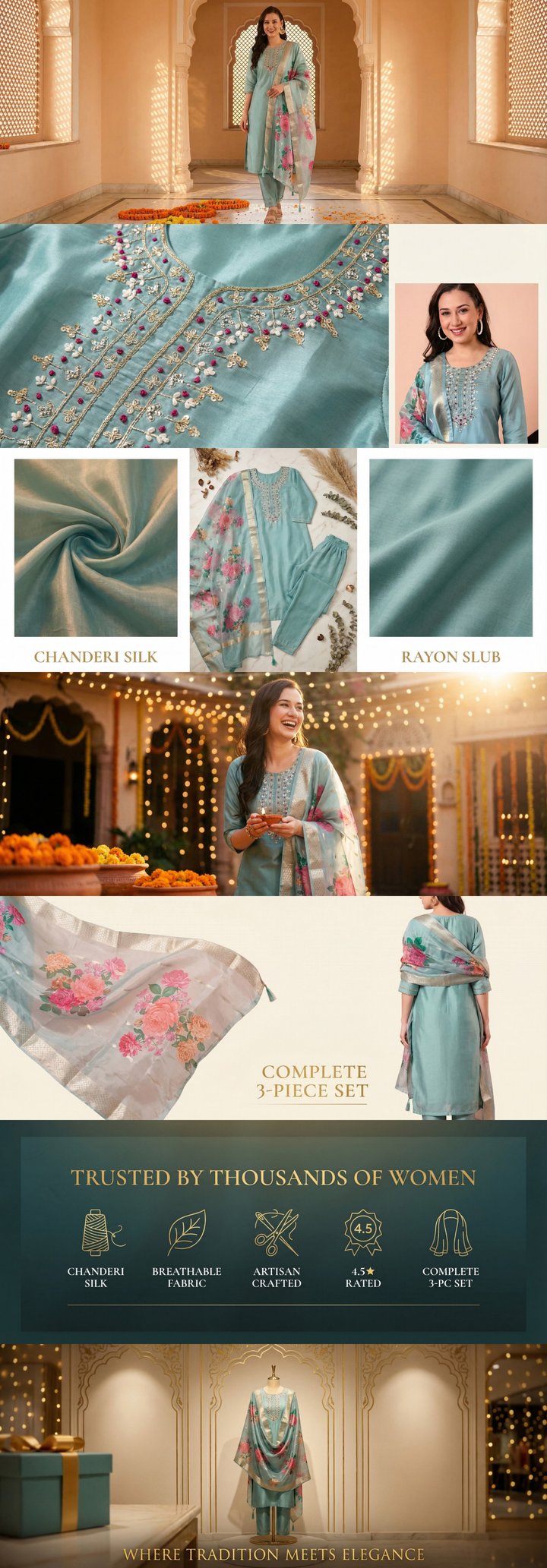 Built by zonfy in 90 seconds
↑ Real output. Try it free →
Table of contents
Why Design Quality Separates Winners from Everyone Else
The difference between A+ Content that converts and A+ Content that gets scrolled past often comes down to design quality. Two sellers can use the exact same 7-module framework, cover the same product features, and follow the same content strategy — yet one converts at 15% and the other at 8%. The variable is design execution.
We studied A+ Content from over 200 top-performing Amazon sellers — those consistently ranking in the top 10 for competitive keywords with high conversion rates — and identified the design principles they share. These are not theoretical graphic design rules. They are practical, proven patterns that work specifically in the Amazon A+ Content context.
Typography That Converts
The 3-Second Rule
Top sellers design their A+ Content text with the assumption that customers will give each module 3 seconds of attention. In those 3 seconds, the customer needs to grasp the key message and decide whether to look closer.
This means:
- Headlines are large and bold. The primary message in each module should be readable in under 1 second.
- Body text is secondary. Detailed supporting text is there for customers who want more, but the headline alone should communicate the core benefit.
- Font sizes follow a clear hierarchy. Headlines at 24-32px, subheadings at 18-22px, body text at 14-16px (within images — Amazon's text fields render at fixed sizes).
Font Selection
Use no more than 2 fonts. One for headlines, one for body text. More than two fonts creates visual chaos. Top sellers typically use:
- A sans-serif font for headlines (clean, modern, bold)
- The same sans-serif or a complementary serif for body text (readable, trustworthy)
Avoid decorative fonts. Script fonts, handwritten styles, and novelty typefaces reduce readability and look unprofessional at Amazon's rendering sizes.
Ensure readability at mobile sizes. Text within images renders at roughly 50% of desktop size on mobile. If your text is readable at desktop but illegible on mobile, you have lost 70% of your audience. For comprehensive mobile optimization strategies, see our mobile A+ Content guide.
Text Within Images vs. Amazon Text Fields
Top sellers use text within images strategically:
- Headlines and key callouts are embedded in images (more design control)
- Detailed descriptions use Amazon's text fields (searchable, accessible)
- Alt text is always descriptive and keyword-relevant (see our Rufus AI optimization guide)
Color Theory for A+ Content
Brand Color Consistency
Every top-performing seller maintains strict color consistency across their A+ Content. This means:
- A primary brand color used for headlines, borders, and accent elements
- A secondary color for supporting elements
- Neutral backgrounds (white, light gray, soft cream) that let the product stand out
- Consistent color treatment across all 7 modules
The Background Debate: White vs. Colored
Analysis of top sellers reveals a clear pattern:
- 70% use white or near-white backgrounds for their A+ modules
- 20% use light, muted colored backgrounds (soft gray, cream, light blue)
- 10% use dark or bold colored backgrounds (typically in Premium A+ or brand-specific aesthetics)
White backgrounds work because they do not compete with the product for attention, they match Amazon's overall page aesthetic, and they render consistently across devices.
Colored backgrounds can work if they are integral to your brand identity, but they require more design skill to execute well. Dark backgrounds make text readability challenging and can create jarring visual transitions on the Amazon page.
Contrast and Accessibility
Ensure sufficient contrast between text and background in every module:
- Dark text on light backgrounds (minimum contrast ratio of 4.5:1 for body text)
- If using text on images, add a semi-transparent overlay behind the text
- Avoid placing text over busy, detailed product images without an overlay
Color Psychology in Product Context
Top sellers match their color palette to category expectations:
- Health and wellness: Greens, blues, whites — clean and trustworthy
- Luxury products: Black, gold, deep navy — premium and exclusive
- Children's products: Bright primaries, pastels — playful and safe
- Tech products: Cool grays, blues, whites — modern and precise
- Organic/natural: Earth tones, greens, kraft textures — authentic and eco-friendly
Try zonfy free
Generate Amazon A+ Content in 90 seconds
7 professional A+ images (1464×600 desktop + 600×450 mobile) sized exactly for Seller Central. Built from your product photos in 90 seconds.
Generate A+ Content →Your first generation is free. No credit card required.
Layout Principles
Visual Flow
Top sellers design their A+ Content with intentional visual flow — the path a customer's eye follows as they scroll through the modules. The most common effective patterns:
The Z-pattern. Within each module, the eye moves from top-left to top-right, then diagonally to bottom-left, then across to bottom-right. Place your most important element (headline or key image) in the top-left position.
The inverted pyramid. Start with the broadest, most impactful visual (hero image), then progressively narrow to more specific details (features, specs, comparisons). This mirrors how customers naturally move from interest to evaluation.
White Space
One of the most common design mistakes in A+ Content is cramming too much into each module. Top sellers use white space generously:
- Margins around text blocks prevent them from feeling claustrophobic
- Space between feature items makes each one distinct and scannable
- Breathing room around product images keeps focus on the product
White space is not wasted space. It is a design tool that directs attention and reduces cognitive load.
Module Transitions
The transition between modules matters. Top sellers ensure that:
- Adjacent modules do not clash visually (no bright green module next to a bright red one)
- There is a logical narrative flow from one module to the next
- Color intensity and visual weight vary to create rhythm (a dense, detailed module followed by a cleaner, simpler one)
Image Design Best Practices
Product Photography Standards
Top sellers share these photography standards:
- Consistent lighting across all product shots — no mix of warm and cool tones
- Consistent angles for the same type of shot (all flat-lays at the same angle, all hero shots from the same perspective)
- Professional editing with clean backgrounds, accurate colors, and sharp focus
- Real environment shots for lifestyle images — not obvious composites or stock backgrounds
Infographic Design
Many A+ modules are essentially infographics — images that combine product photography with text, icons, and data visualizations. Top sellers excel at infographic design:
Use icons consistently. Choose an icon style (line icons, filled icons, illustrated icons) and maintain it across all modules. Mixing icon styles looks amateurish.
Limit information per module. Each module should communicate one main idea with 3-5 supporting points. More than that overwhelms the viewer.
Use callout lines. When pointing to specific product features within an image, use clean callout lines with text labels. Keep lines thin and consistently colored.
Create visual hierarchy with size. The most important element in any module should be the largest. Supporting elements should be progressively smaller.
Image Composition for Amazon
Amazon's rendering environment creates specific composition requirements:
Safe zones. Keep critical content away from module edges. Amazon's rendering can clip edges slightly, and mobile rendering further reduces visible area.
Focal point placement. Place your product or key visual element slightly off-center (following the rule of thirds) for more dynamic composition.
Background simplicity. Complex backgrounds compete with product information. The best A+ Content uses simple, clean backgrounds that keep focus on the product and messaging.
Mobile-First Design
The Mobile Reality
With over 70% of Amazon traffic from mobile devices, designing for mobile is not an optimization — it is the primary design target.
Top sellers follow these mobile-first principles:
- Minimum text size of 24px within images (appears as roughly 12px on mobile screens)
- Single-column information architecture within each module
- Large, tappable product images that remain detailed at small sizes
- Short text blocks — no paragraph exceeds 3 lines on mobile rendering
Testing on Mobile
Before submitting A+ Content, top sellers preview their content on actual mobile devices:
- View on an iPhone SE (smallest common screen) to test minimum readability
- View on a standard Android phone to check rendering differences
- Scroll through the full A+ Content at normal speed to assess flow
- Check that no critical information is lost at mobile dimensions
For detailed mobile optimization techniques, see our dedicated mobile A+ Content guide.
Lessons from Specific Categories
Beauty Sellers
Top beauty sellers on Amazon master texture photography. Close-up shots of product texture — cream swirls, powder gradients, liquid drops — create visceral, sensory appeal that static product shots cannot match. Their color palettes are soft, their layouts are airy, and every module feels premium. See our beauty A+ Content guide for category-specific strategies.
Electronics Sellers
Top electronics sellers use dark backgrounds effectively — something most categories should avoid. Against dark backgrounds, product renders with subtle lighting effects look premium and tech-forward. They also excel at using exploded views and transparent renders that show internal components. Our electronics A+ Content guide covers more detail.
Food & Grocery Sellers
Top food sellers make you hungry. Their hero images feature ingredients that look fresh, plated dishes that look appetizing, and packaging that looks premium. Color temperature tends warm, lighting is directional and dramatic, and styling follows food photography conventions. See our food A+ Content guide.
Fashion Sellers
Top fashion sellers create lookbook-quality A+ Content. Their lifestyle images feature styled outfits in aspirational settings. Product detail shots show fabric texture, stitching quality, and hardware close-ups. Their layouts are editorial and magazine-like. Our fashion A+ Content guide has detailed strategies.
Design Tools and Resources
Professional Tools
- Adobe Photoshop — Industry standard for image editing and module design
- Adobe Illustrator — Best for icon creation and infographic design
- Figma — Excellent for collaborative A+ Content design with template libraries
- Canva Pro — Good for sellers without professional design skills
AI-Powered Design
For sellers who need professional-quality A+ Content without professional design skills or budgets, AI tools bridge the gap. zonfy generates complete 7-image A+ sets with consistent styling, proper dimensions, and category-appropriate design — applying many of the design principles discussed in this article automatically.
Design System Checklist
Before creating any A+ Content, establish your design system:
- Primary brand color (hex code)
- Secondary brand color (hex code)
- Background color (usually white or near-white)
- Headline font and size
- Body text font and size
- Icon style (line, filled, illustrated)
- Photography style (lighting, angles, backgrounds)
- Image dimension templates for each module type
Document these decisions and apply them consistently across every A+ Content you create. Consistency is the single most impactful design decision you can make.
The 80/20 of A+ Content Design
If you take only five design principles from this article, make them these:
- Consistency across all 7 modules — Same fonts, colors, image treatment, and quality level
- Mobile-first text sizing — If it is not readable on a phone, it does not exist for 70% of your customers
- White space — Give every element room to breathe
- One idea per module — Do not cram multiple messages into a single module
- Professional product photography — No amount of graphic design compensates for poor product photos
These five principles, applied consistently, will put your A+ Content in the top 20% of Amazon listings. For the complete A+ Content creation framework, see our step-by-step guide. And to avoid the most damaging design mistakes, review our guide on A+ Content mistakes that kill sales.