The Complete Guide to Amazon A+ Content in 2026
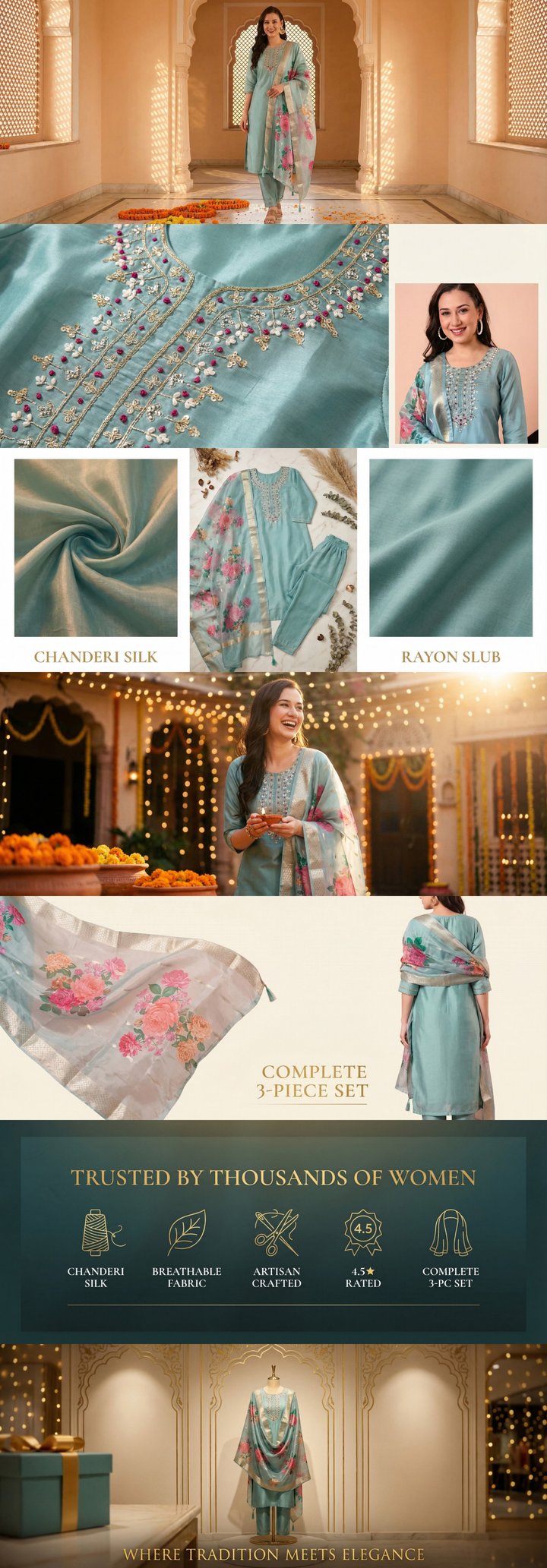 Built by zonfy in 90 seconds
↑ Real output. Try it free →
Table of contents
What Is Amazon A+ Content?
Amazon A+ Content, formerly known as Enhanced Brand Content (EBC), is a feature available to brand-registered sellers on Amazon that allows them to replace the standard text product description with rich, visually enhanced content. Instead of a plain block of text, you get to showcase your product with high-quality images, comparison charts, brand storytelling, and formatted text layouts.
Think of it as your product's landing page within Amazon. While your main images and bullet points handle the initial impression, A+ Content occupies the space below the fold and serves as the closer — the section that converts browsers into buyers.
Amazon reports that A+ Content can increase sales by 3-10% on average, with some categories seeing even higher lifts. For competitive niches, the difference between a listing with and without A+ Content can be the difference between page one and page three.
Why A+ Content Matters in 2026
The Amazon marketplace has matured significantly. In 2026, the average Amazon search results page features sellers with professional photography, optimized bullet points, and polished A+ Content. Listings without A+ Content stand out — but for the wrong reasons.
Here is why it matters now more than ever:
Conversion rate impact. Amazon's own data consistently shows that listings with A+ Content convert at higher rates. The rich imagery and structured layouts help customers understand your product faster, reducing hesitation and increasing add-to-cart rates.
Reduced return rates. When customers have a thorough understanding of what they are buying — dimensions, materials, use cases, comparisons — they are less likely to return the product. A+ Content lets you set accurate expectations visually.
Brand building on Amazon. Amazon is no longer just a transactional marketplace. Customers browse, compare, and develop brand preferences. A+ Content gives you dedicated real estate to tell your brand story and differentiate from white-label competitors.
SEO benefits. While Amazon has stated that A+ Content text is not directly indexed for search, the improved conversion rates and reduced bounce rates positively influence your listing's algorithmic ranking. Better conversions signal to Amazon's A9 algorithm that your listing deserves higher placement.
Mobile experience. Over 70% of Amazon traffic now comes from mobile devices. A+ Content renders beautifully on mobile, with images stacking vertically and text remaining readable. Plain text descriptions, on the other hand, are often skipped entirely on mobile.
Types of A+ Content
Amazon offers two tiers of A+ Content, each with different capabilities and requirements.
Basic A+ Content
Basic A+ Content is available to all brand-registered sellers at no additional cost. It provides access to a set of predefined modules that you can mix and match to create your product description.
Key features of Basic A+ Content:
- Up to 7 content modules per listing
- Standard image modules at 970x600px
- Text and image combination layouts
- Comparison charts for product variants
- No video support
- Available to all Brand Registry members
Basic A+ is where most sellers start, and for many products, it provides more than enough capability to create compelling content. The modules include single image with text overlay, multi-image layouts, feature highlight grids, and comparison tables.
Premium A+ Content
Premium A+ Content (formerly A+ Premium or A++ Content) offers a significantly enhanced set of modules with larger images, interactive elements, and more creative flexibility.
Key features of Premium A+ Content:
- Larger hero images at 1464x600px (desktop) and 600x450px (mobile)
- Interactive hover hotspot modules
- Enhanced comparison charts
- Video integration within modules
- Carousel image galleries
- Full-width banner modules
- Navigation anchor modules for long-form content
Premium A+ was historically available only to vendors or sellers who met specific spending thresholds, but Amazon has been gradually expanding access. As of 2026, sellers with a track record of quality A+ Content and Brand Story usage can qualify for Premium access.
The visual impact of Premium A+ is substantial. The wider images and interactive modules create an experience closer to a branded e-commerce site than a typical Amazon listing.
Try zonfy free
Generate Amazon A+ Content in 90 seconds
7 professional A+ images (1464×600 desktop + 600×450 mobile) sized exactly for Seller Central. Built from your product photos in 90 seconds.
Generate A+ Content →Your first generation is free. No credit card required.
A+ Content Image Specifications
Getting your image dimensions right is critical. Amazon will reject submissions with incorrect specifications, and poorly sized images look unprofessional.
Basic A+ Image Sizes
| Module Type | Dimensions | Notes |
|---|---|---|
| Standard single image | 970 x 600 px | Most common module |
| Image with light text overlay | 970 x 300 px | Banner-style |
| Standard comparison chart | 150 x 150 px per cell | Product images |
| Four-image quadrant | 220 x 220 px each | Grid layout |
Premium A+ Image Sizes
| Module Type | Desktop | Mobile |
|---|---|---|
| Full-width hero banner | 1464 x 600 px | 600 x 450 px |
| Standard module | 1464 x 600 px | 600 x 450 px |
| Comparison chart | 150 x 150 px | Same |
All images should be in JPEG or PNG format, with RGB color mode. Amazon recommends keeping file sizes under 2MB per image, though up to 5MB is technically accepted. Resolution should be 72 DPI for web display.
For a comprehensive breakdown of every module and dimension, see our detailed guide on A+ Content image sizes and specifications.
How to Create A+ Content: The Process
Step 1: Register Your Brand
Before you can access A+ Content, you need to enroll in Amazon Brand Registry. This requires:
- An active registered trademark (text-based or image-based)
- A Amazon Seller Central or Vendor Central account
- Verification of your brand ownership
The Brand Registry enrollment process typically takes 2-4 weeks once you have a registered trademark.
Step 2: Plan Your Content Strategy
Do not jump straight into design. A successful A+ Content strategy starts with understanding:
- Your target customer. What information do they need to make a purchase decision? What objections might they have?
- Your competitive landscape. What are top competitors doing with their A+ Content? Where can you differentiate?
- Your product's key selling points. Which features or benefits deserve dedicated visual modules?
- Your brand story. What narrative connects your products and builds customer loyalty?
Step 3: Design Your Modules
Once you have a strategy, select the modules that best serve your content goals. A proven 7-image A+ framework includes:
- Hero banner — High-impact brand image with product positioning
- Feature highlights — 3-4 key product features with supporting images
- Lifestyle/usage scene — Product shown in real-world context
- Technical specifications — Dimensions, materials, certifications
- Comparison chart — Your product vs. alternatives or product variants
- Brand story — Your brand's origin, values, and quality standards
- Cross-sell banner — Showcase complementary products from your catalog
Step 4: Create or Generate Images
You have several options for creating A+ images:
- Professional photography + graphic design. The traditional approach. Costs $300-1000+ per listing but produces custom results.
- Template-based tools. Platforms that provide A+ templates you can customize with your product images. Faster and cheaper, but less unique.
- AI-powered generation. Tools like zonfy that analyze your product and generate complete A+ image sets automatically, combining the speed of templates with the customization of professional design.
Step 5: Upload and Submit
Upload your completed modules through Seller Central under Advertising > A+ Content Manager. Amazon's review process typically takes 7 business days, though it can be faster during off-peak periods.
A+ Content Best Practices
Design Best Practices
Use high-contrast text. Ensure any text within your images is readable against the background. Amazon customers view listings on various devices with different screen qualities.
Maintain brand consistency. Use consistent colors, fonts, and visual styling across all your A+ modules. This builds brand recognition and creates a professional impression.
Design for mobile first. Since most Amazon traffic is mobile, ensure your most important information is visible and readable on smaller screens. Avoid tiny text within images.
Show, do not tell. Use images to demonstrate product benefits rather than relying on text. A photo of a backpack being used on a mountain trail communicates "durable and adventure-ready" better than text ever could.
Content Best Practices
Lead with benefits, not features. Instead of "Made with 316 stainless steel," lead with "Rust-proof for years of daily use" and then mention the material.
Address objections. Use your A+ Content to preemptively answer the questions that lead to hesitation. If customers frequently ask about sizing in reviews, include a detailed size guide module.
Use comparison charts strategically. Comparison charts are one of the highest-converting A+ modules. Use them to compare your product variants (guiding customers to the right option) or to compare your product against generic alternatives (always tastefully — Amazon prohibits naming competitors directly).
Include a brand story. Customers increasingly care about who they buy from. A dedicated module sharing your brand's origin, values, or manufacturing process builds trust and loyalty.
Compliance Rules
Amazon has strict guidelines for A+ Content. Violations will result in rejection and repeated violations can lead to loss of A+ privileges.
Prohibited content includes:
- Pricing information or promotional language ("sale," "discount," "free shipping")
- References to competitor brands
- Time-sensitive claims ("best seller of 2025")
- Warranty or guarantee language
- External URLs or contact information
- Unsubstantiated superlatives ("best," "number one") without proper citation
- QR codes or barcodes
- Customer quotes or testimonials (unless through Amazon's Vine program)
Image-specific rules:
- No blurry, pixelated, or stretched images
- No watermarks or logos of third-party brands
- No lifestyle images that imply unsafe product usage
- All text within images must be in the listing's language
- Images must be at the exact dimensions specified for each module
Measuring A+ Content Performance
Amazon does not provide a direct A/B testing tool specifically for A+ Content, but you can measure its impact through:
- Unit session percentage (conversion rate) in your Business Reports
- Sessions and page views to track traffic
- Return rate changes after A+ implementation
- Customer questions frequency — A well-designed A+ section reduces buyer uncertainty
Track these metrics for 2-4 weeks before and after implementing A+ Content to establish a clear baseline comparison.
Common Mistakes to Avoid
Using only text modules. A+ Content's power is visual. Listings that use only text-based modules miss the entire point and perform worse than they should.
Ignoring mobile rendering. Always preview how your A+ Content looks on mobile before submitting. Images that look great on desktop can be unreadable on a phone screen.
Inconsistent branding. Mixing different design styles, colors, or image qualities across modules makes your listing look unprofessional and reduces trust.
Keyword stuffing in alt text. While you should use relevant keywords in your image alt text, stuffing them with repetitive keywords can flag your content for review.
Set-and-forget mentality. Your A+ Content should evolve with your product and market. Update it seasonally, when you get new customer insights from reviews, or when you identify new competitive advantages.
Getting Started
If you are a brand-registered Amazon seller and have not yet set up A+ Content, you are leaving conversions on the table. Start with Basic A+ Content for your top-selling ASINs, measure the impact, and expand from there.
For sellers who want professional results without the time investment of manual design, AI-powered tools can generate complete A+ image sets in minutes rather than days. zonfy generates 7 Amazon-spec A+ images from your product photos in about 90 seconds — a practical option for sellers managing multiple SKUs.
The most important thing is to start. Even basic A+ Content with clean images and clear messaging will outperform a plain text description every time.